That old Android phone?
It's a monitor now.
Tangled charger, a case you never liked, eleven percent battery. The camera still works though, and so does the mic. Put it on a shelf by the cot and it does the same job as the one in the shop, with a better lens.
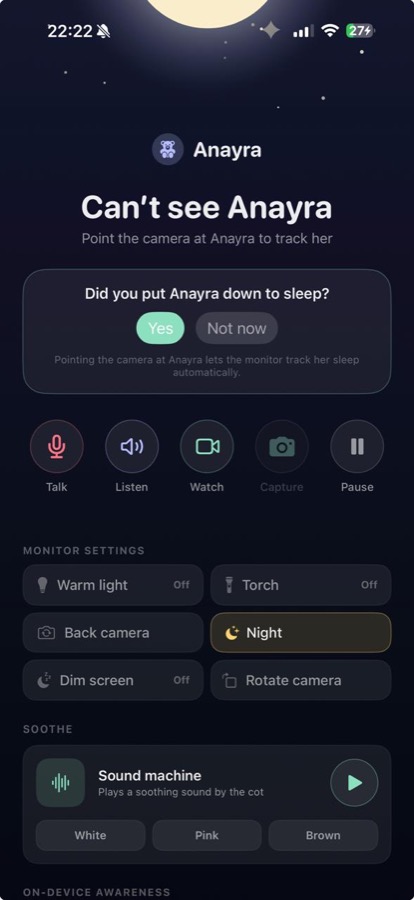
It was never only for babies
One spare phone or tablet, and it watches whoever needs watching. Set it up once, and point it at whatever this month is about.
Baby
Cry alerts worked out on the device, sleep and feeds written down, and a night view that keeps the room dark.
Pets · Beta
With Anywhere, watch and talk from work. Pet Beta alerts stay off until you turn them on.
Elder care · Beta
Look in and speak into the room. Optional Elder Beta alerts, including fall detection, stay off until you enable them.
Home · Beta
The hallway, back door, or workshop, with optional Home Beta alerts off until you enable them.
Your old phone is the better camera
A monitor from a shop is a small camera, a small mic and a small radio in a box. Your old phone is a better camera, a better mic and three kinds of radio, and you've already paid for it.
What it was missing was judgement. nuvio adds that, and runs it on the device: it can tell a cry from a fan, and real movement from headlights crossing the ceiling.
So it tells you when you're needed, and leaves you alone when you're not.
Android 8.0 and up, so nearly everything
Phone or tablet. If it was made since about 2017 and still charges, it'll do the job.
Android 8.0 Oreo or newer
Most things sold in the last few years. Samsung, Pixel, Xiaomi, OnePlus, Motorola, all fine.
Tablets are lovely for this
An old tablet stands up on a shelf and holds a steadier view than a propped phone.
Mix and match
The monitor and viewer do not have to match. With Anywhere, you can also use a browser.
Four minutes, most of it finding the charger
1. Give it a spot
Plugged in, pointed at the cot, cable out of reach.
2. Scan the code
Your everyday phone scans a code on the old one. They meet on your WiFi.
3. Leave it to it
No account to make first. Nothing to wait in for.
Android will try to send it to sleep
This is the one real difference from an iPhone, and it's worth two minutes of your evening.
Android puts background apps to sleep to save battery. That's good for most apps and bad for a monitor.
So when nuvio asks to skip battery optimisation during setup, say yes. It's the most important tap in the whole thing. A monitor that falls asleep at 2am is no use to anyone.
Samsung, Xiaomi, OnePlus and Huawei each add their own version on top. Look in Settings, under Battery, for a list called something like Sleeping apps, and make sure nuvio isn't on it.
You'll see a notification you can't swipe away while it's watching. That's Android being straight with you: the camera and mic really are on. Leave it there.
Then plug it in and let the screen go off. It keeps watching, and it stays cooler.
Everything a monitor should, none of it in a cloud
Cry alerts you can trust
Worked out on the device, so an alert means a cry and not the washing machine.
Live video
Home or away, and easy on your eyes at 3am.
Talk to them
Say something from the sofa, the office, or the bus.
The day, written down
Sleeps, cries and feeds, as they happen.
Share it
A partner, a grandparent, a sitter. Each invited with a code, each removed in a tap.
More than one room
Nursery, hallway, front door, all on one screen. No fee per camera.
Your video never leaves your home
Not uploaded to a cloud. Not kept on our servers. Not shared with or sold to anyone.
The listening and the watching happen on the device itself. Nothing is sent away to be worked out somewhere else, because it gets worked out where it is.
When you open the live view, the picture goes straight from that device to your screen, encrypted end to end, and isn't recorded on the way. If the two can't reach each other directly it goes through a relay, and the relay can't read any of it either.
There are no adverts in nuvio, and no data brokers. If you turn on Help improve detection, it shares model scores, event outcomes and device performance with us. Never audio, video or images.
Every device that can see your camera is listed on the monitor, and you can remove any of them in one tap.
FAQ
Which Android devices work?
Any phone or tablet on Android 8.0 Oreo or later, which is most things made since about 2017. A tablet is often the steadier choice.
Why does it ask to skip battery optimisation?
Because Android would otherwise put it to sleep to save power, and a sleeping monitor is no monitor. Saying yes is what lets it keep listening all night.
Why is there a notification I can't swipe away?
Android insists on one whenever an app is really using the camera or mic. It's a promise being kept, and it also stops the system killing the job. Leave it.
My Samsung keeps closing apps. What do I do?
Samsung, Xiaomi and a few others add their own battery manager. In Settings, under Battery, find the list called something like Sleeping apps and make sure nuvio isn't on it.
Can I watch from an iPhone?
Yes. An Android monitor works with an iPhone viewer. With Anywhere, you can also use a browser.
What does it cost?
Anywhere is free for the first 7 days. No payment method. No automatic renewal. Then Home is $1.99 a month or $19.99 a year. Anywhere is $3.99 a month or $39.99 a year. There is no fee per camera.
Go and dig it out of the drawer
It is probably in the second drawer down. Four minutes from now it can be doing something that matters.