Peace of mind for you.
Dignity for them. Beta
The phone calls get shorter. You start ringing at odd hours just to hear that everything's normal, and you can tell they're finding it a bit much. There's a way of looking out for someone that doesn't involve hovering, and a spare tablet on the sideboard does most of it.
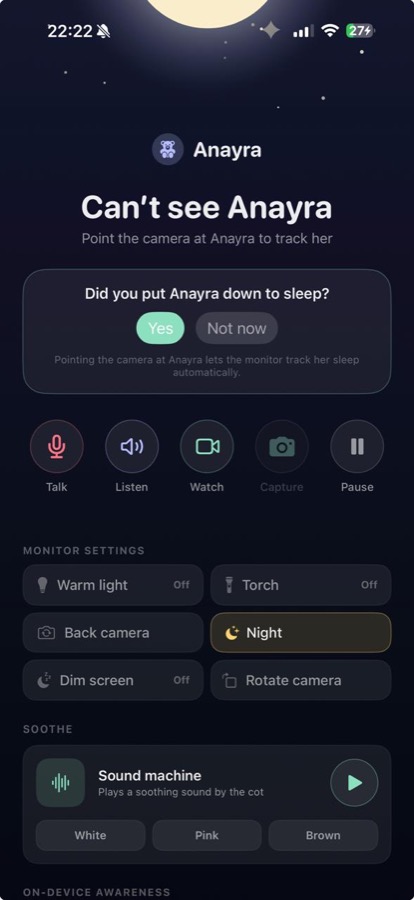
It was never only for babies
One spare phone or tablet, and it watches whoever needs watching. Set it up once, and point it at whatever this month is about.
Baby
Cry alerts worked out on the device, sleep and feeds written down, and a night view that keeps the room dark.
Pets · Beta
With Anywhere, watch and talk from work. Pet Beta alerts stay off until you turn them on.
Elder care · Beta
Look in and speak into the room. Optional Elder Beta alerts, including fall detection, stay off until you enable them.
Home · Beta
The hallway, back door, or workshop, with optional Home Beta alerts off until you enable them.
The conversation comes first
Most products skip this part. It's the part that decides whether any of it works.
Tell them. Show them the tablet, show them what you can see, and let them pick the room. Something set up quietly, that they find out about later, breaks trust in a way no feature fixes.
Put it in shared space. A living room or a hallway is a very different thing from a bedroom, and for most families that's the line worth keeping.
Agree what it's for. Almost always the honest answer isn't surveillance. It's so nobody has to ring five times a day, and so a fall in an empty house gets noticed in minutes rather than hours.
And let them switch it off. Someone who can pause it is someone who has agreed to it.
Quiet by default
Fall alerts · Beta
Optional and off by default. If enabled, treat them as a prompt to look—not proof of a fall or a medical alarm.
A look, without a phone call
Open the live view for five seconds, see the kettle's on, get on with your day.
Your voice in the room
Two way talk, so a check in can be a hello instead of a ringing phone they have to get up for.
A sense of the day
Movement and quiet written down, so a change over a week shows up without anyone keeping notes.
Share it with your siblings
Everyone can look in, so it stops being one person's job. Access given and taken back in a tap.
Nothing kept in a cloud
Worked out on the device in their home. No recordings on a company's servers.
Easier to set up than to explain
1. A spare tablet on the sideboard
Plugged in, with a view across the room they actually use. An old iPad or Android tablet is ideal.
2. Scan the code once
It keeps working on their WiFi from then on.
3. Ring less, worry less
Look in when you think of them, across WiFi or mobile data. Enable individual Beta alerts only with their agreement.
What this isn't
nuvio isn't a medical device, and nothing it shows you is a clinical judgement. It doesn't diagnose, it doesn't watch vital signs, and it shouldn't be leaned on as a medical alarm.
Fall detection is in Beta, off by default, and may miss a fall or raise a false alert. If someone's genuinely at risk of falling, a proper alarm service and a word with their GP come first; this must never be their only safeguard.
It's not a substitute for people either. It buys you a bit less worry between visits. The visits still matter most.
Your video never leaves your home
Not uploaded to a cloud. Not kept on our servers. Not shared with or sold to anyone.
The listening and the watching happen on the device itself. Nothing is sent away to be worked out somewhere else, because it gets worked out where it is.
When you open the live view, the picture goes straight from that device to your screen, encrypted end to end, and isn't recorded on the way. If the two can't reach each other directly it goes through a relay, and the relay can't read any of it either.
There are no adverts in nuvio, and no data brokers. If you turn on Help improve detection, it shares model scores, event outcomes and device performance with us. Never audio, video or images.
Every device that can see your camera is listed on the monitor, and you can remove any of them in one tap.
FAQ
Do they have to wear a pendant?
No. Nothing to wear, nothing to charge, nothing to remember. The tablet on the sideboard does the work, which is why it's usually still working six months later.
Is this a medical alert system?
No. nuvio isn't a medical device and doesn't replace a monitored alarm service. Fall detection is an optional Beta feature, off by default, and not a clinical guarantee.
Is it fair to put a camera in a parent's home?
It depends entirely on whether they've agreed. Told about it, in shared space, and switchable off whenever they like, most families find it takes the friction out. Set up in secret, it's a betrayal.
Can my brothers and sisters see it too?
Yes. Invite each of them with a code, so looking in stops being one person's job. Anyone can be removed again in a tap.
Where's the video kept?
Nowhere. It travels encrypted from their tablet to your screen when you open it, isn't recorded to a server, and isn't shared with anyone else.
What does it cost?
Anywhere is free for the first 7 days. No payment method. No automatic renewal. Then Home is $1.99 a month or $19.99 a year. Anywhere is $3.99 a month or $39.99 a year. There is no fee per camera.
Go and dig it out of the drawer
It is probably in the second drawer down. Four minutes from now it can be doing something that matters.