The best monitor in the house is one you already own
Nearly every home has one. A phone or tablet two upgrades old, at eleven percent, still holding photos you keep meaning to move. It's a proper computer with a good lens and a real mic, and it's doing nothing at all. Here's how to put it to work tonight.
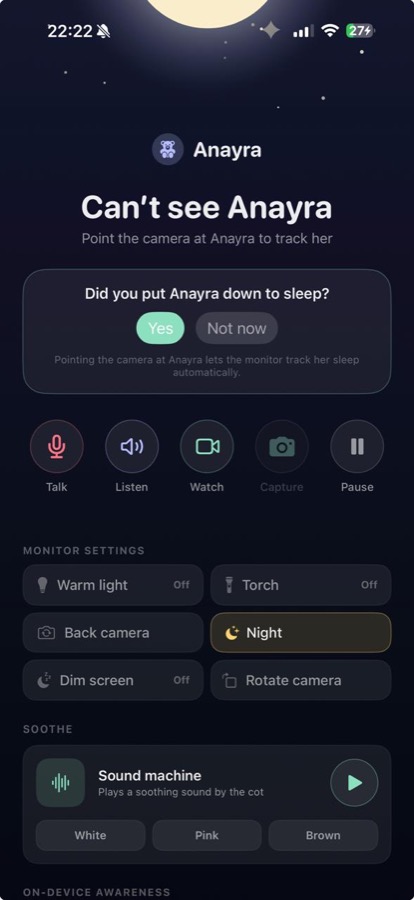
It was never only for babies
One spare phone or tablet, and it watches whoever needs watching. Set it up once, and point it at whatever this month is about.
Baby
Cry alerts worked out on the device, sleep and feeds written down, and a night view that keeps the room dark.
Pets · Beta
With Anywhere, watch and talk from work. Pet Beta alerts stay off until you turn them on.
Elder care · Beta
Look in and speak into the room. Optional Elder Beta alerts, including fall detection, stay off until you enable them.
Home · Beta
The hallway, back door, or workshop, with optional Home Beta alerts off until you enable them.
What two hundred pounds actually buys
A monitor from a shop gets you a fixed camera, a small screen and a promise. Plenty of them also get you an account, a subscription, and a company that now holds video of a room in your house.
The thing in your drawer has a much better sensor, a mic built to pick a voice out of a noisy street, a screen you already know, and a chip fast enough to work out what it's hearing without sending it anywhere.
There's no trick to this. The hardware's been good enough for years. It was only ever missing an app that took the job seriously.
Three things to have to hand
A charger that reaches
It'll run on battery, but a monitor shouldn't be something you have to remember to charge. Plug it in and forget it.
Something to prop it on
A stand is nicest. A stack of books or a mug behind it works too. A tablet will often stand up by itself.
Your home WiFi
Both devices join the same network and talk straight to each other. On your own WiFi they don't need the internet at all.
A few inches make all the difference
Frame the whole cot, not a close up of a face. You want to see that they've rolled over, kicked the blanket off, or sat up, and a wider view tells you all three at a glance.
Put it slightly above, looking down. Level with the mattress mostly gets you a view of the bars.
Keep the device and every inch of the cable outside the cot and out of reach. This is the one rule with no give in it. A monitor should never be the hazard.
Try not to point it at a window. A bright background turns everything in front of it into a silhouette, at exactly the hour you want to see properly.
Things a boxed monitor can't do
It knows what it's hearing
A cry, a bark, a fall. Worked out on the device, so an alert means something.
It works away from home
Anywhere lets you watch from work or a restaurant. You do not need a base station.
You can share it
Grandparents and sitters get their own way in, and lose it again in a tap.
It grows
Add the hallway, then the front door. One screen, no charge per camera.
It writes the day down
A real timeline, instead of trying to remember when the last feed was.
It keeps the good bits
The first proper smile, saved without you having to be stood there holding a phone.
When you should just buy one
If you want something that never gets a notification, never updates, and does one job for five years, buy the boxed monitor. That simplicity is a real feature and we're not going to pretend otherwise.
If you've got no spare device at all, a cheap handset or tablet is usually still better value than a mid range monitor. But it isn't free any more, and that changes the sums.
And if you need proper medical monitoring, no phone app and no shop monitor is the answer. Talk to a clinician about kit made for that.
For everyone else, the thing in the drawer wins on picture, on hearing, on privacy, and on cost.
Your video never leaves your home
Not uploaded to a cloud. Not kept on our servers. Not shared with or sold to anyone.
The listening and the watching happen on the device itself. Nothing is sent away to be worked out somewhere else, because it gets worked out where it is.
When you open the live view, the picture goes straight from that device to your screen, encrypted end to end, and isn't recorded on the way. If the two can't reach each other directly it goes through a relay, and the relay can't read any of it either.
There are no adverts in nuvio, and no data brokers. If you turn on Help improve detection, it shares model scores, event outcomes and device performance with us. Never audio, video or images.
Every device that can see your camera is listed on the monitor, and you can remove any of them in one tap.
FAQ
What kind of device do I need?
An iPhone or iPad on iOS 15 or later, or an Android phone or tablet on Android 8.0 or later. In practice that's most things made since 2015 on iOS and 2017 on Android. Tablets make lovely monitors.
Does it need a SIM card?
No. It only needs to join your WiFi. A phone with no service, or a WiFi only tablet, works perfectly well.
How far does it reach?
Home works on the same Wi-Fi as your monitor. Anywhere works on any Wi-Fi or mobile network.
Can I use more than one?
Yes. Add the nursery, then the hallway, then whatever else you'd rather glance at than wonder about. They sit together on one screen, with no charge per camera.
Is it safe to leave it charging near a cot?
Use the charger it came with or a good replacement, keep the device and the whole cable outside the cot and out of reach, and don't cover it with anything.
What happens to the video?
It goes from the monitor to your screen, encrypted, and isn't stored on the way. It's never uploaded to a cloud and never shared with anyone else.
Go and dig it out of the drawer
It is probably in the second drawer down. Four minutes from now it can be doing something that matters.